


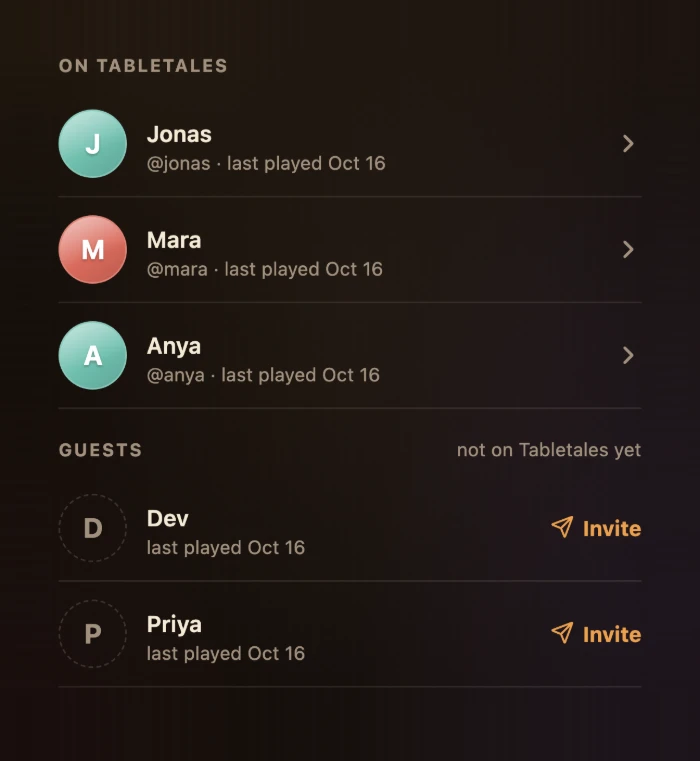
Your crew is everyone at your tables
The Crew tab lists everyone you have shared a game night with. Friends on Tabletales come first, then guests, the people who are not on Tabletales yet. Sort by who you played with recently or by all time, and each person shows when you last played together or how many nights you have shared.
Tap anyone to open their profile: how many game nights and games they have played, their top games or the games you have shared, and every night the two of you have had together.
Add anyone to a night
When you add a night, add the people who were there. Search your crew or a friend's @username, or just type a name. Anyone who is not on Tabletales joins the night as a guest, with a dashed avatar, so the night is complete even if half the table has never heard of the app.
Someone only watched? Mark them as watching. They are part of the night, with no score.
Two phones at one table? If a friend already saved the same night with you on it, Tabletales notices when you save and offers to add your game to their night, so you don't end up with two copies.
After you save: who should keep this night too?
When a night is saved, Tabletales shows who gets it.
- Friends already on Tabletales get the night automatically. Nothing to send.
- Each guest gets a Send button with three ways to pass on their invite link:
- Text opens your own Messages app with the invite already written, and a picture of the night attached when your phone can add one. You pick the person and send it yourself.
- Copy copies the link, to paste wherever you like.
- Share opens your phone's share sheet.
Tabletales never sees your contacts. And if now is not the moment, you can invite anyone later, from the night or from their crew profile.
What your friend sees
- The link. It opens a page that says someone saved a game night with them.
- The app. They get Tabletales, free on iPhone and iPad (Android is coming soon), sign in, and tap the link again.
- The claim. Tabletales asks whether to claim the nights. One tap, and the nights you shared appear in their Memories and Photos, with the photos and the scores.
A few details:
- Already have nights in Tabletales? The claimed nights join the ones they already have, in the same account.
- Each link works once. It is a one-time key to those nights. Once it has been claimed, it stops working.
- A link brings the nights you were both part of. If other friends saved nights with them that you were not at, those friends send their own links.
- Already on Tabletales? Instead of sending a link, open the guest's profile and link the guest to their account. The nights you were both part of move over.
A night belongs to everyone who was there
A saved night is a shared memory. Everyone at the table who is on Tabletales can add photos, fix a score and leave a comment. Only the person who saved the night can change who can see it, or delete it, so nobody can quietly reopen a night someone chose to keep close. And anyone can remove a night from their own timeline without touching anyone else's.
Who can see your nights
Nothing in Tabletales is ever public. The people who were at a night always keep it. Your profile is Open by default, so your crew can browse the nights you have saved; switch it to Private and they see only the nights you shared with them. Each night also has its own setting, chosen by whoever saved it: Open (friends of the table, meaning anyone who has played a game night with someone who was there, can open it), Locked (they see it listed, but only the people who were there can open it) or Hidden (only the people who were there know it exists). Comments and reactions are only ever seen by the people who were there. The full detail is in how privacy works.
